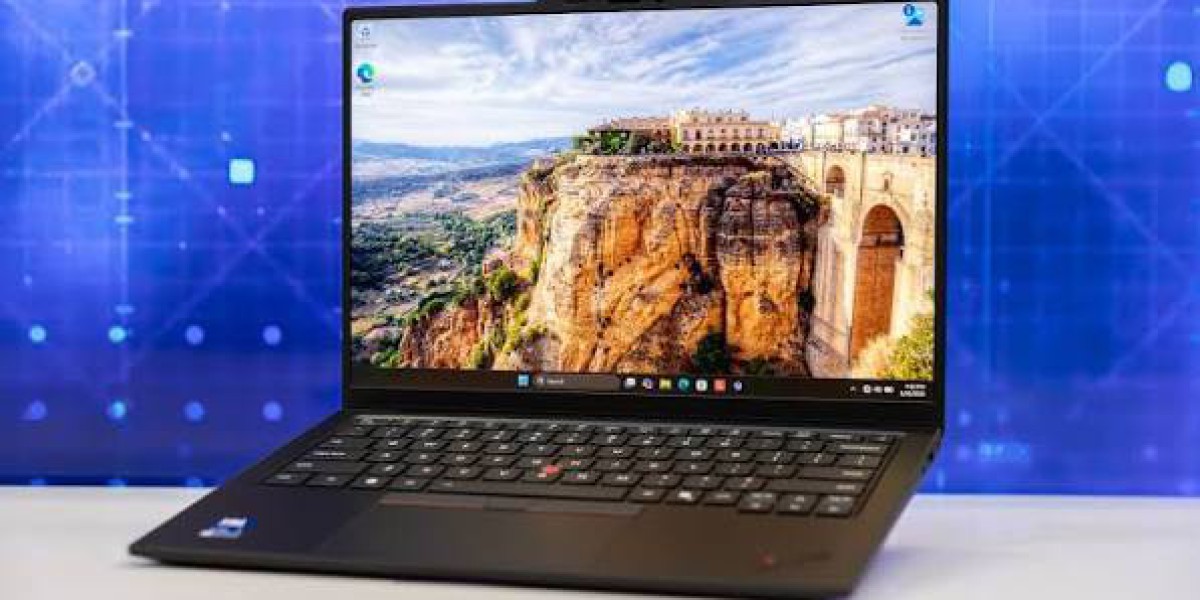

Lenovo ThinkPad X1 Carbon Gen 14 Aura Edition: The Ultimate 2026 Business Ultrabook Reviewed
If you've spent any time researching premium business laptops this year, you've probably noticed one name popping up again and again in "best of" lists: the Lenovo ThinkPad X1 Carbon Gen 14 Aura Edition. It's the latest chapter in one of the most respected laptop lineups in computing history, and it arrives with a redesigned chassis, a genuinely useful set of AI features, and battery life that finally lives up to the marketing hype.
In this article, you'll learn exactly what's new in the Gen 14 Aura Edition, how it performs in the real world, who it's actually built for, and how it stacks up against rivals like the Samsung Galaxy Book6 and the Dell XPS 16 9640. Whether you're an IT manager outfitting a fleet of laptops or a frequent flyer looking for your next travel companion, this guide will help you decide if the X1 Carbon deserves a spot on your desk.
What Is the Lenovo ThinkPad X1 Carbon Gen 14 Aura Edition?
The X1 Carbon has been Lenovo's flagship ultra-lightweight business laptop since 2014, and the Gen 14 Aura Edition represents one of the more significant updates the line has seen in years. Lenovo built this generation around a new internal chassis it calls the "Space Frame."
Rather than a simple spec bump, Lenovo redesigned the internal chassis to dramatically improve repairability and upgradability without compromising the light weight, performance, and quality the X1 Carbon is known for. That new architecture uses a double-sided system board, which shrinks the motherboard's physical footprint and makes the laptop noticeably easier for IT departments to service. Impressively, Lenovo pulled this off without adding any weight, keeping the laptop at just 2.15 pounds, or under one kilogram.
That freed-up internal space wasn't wasted, either. Lenovo used the extra room to fit a 70 percent larger cooling fan, which improves airflow and lets the laptop sustain higher performance for longer stretches.
Design and Build Quality
The "Aura Edition" branding refers to Lenovo's AI-enhanced software suite layered on top of the hardware, but the physical design deserves just as much attention. Reviewers who've gotten hands-on time consistently come away impressed by how light the laptop feels for something so solidly built. One tester with Tom's Hardware described picking up the unit and being surprised at just how insubstantial it felt in hand, joking that it seemed almost hollow before confirming the build quality was, in fact, excellent.
The chassis is built primarily from lightweight magnesium, with carbon fiber reinforcing the lid and its internal frame hence the "Carbon" name that's carried through more than a decade of these laptops. According to Tom's Hardware, the exterior fitment and finish feel premium, and while overall chassis rigidity is only average since the deck flexes a bit more than expected, the lid itself is impressively stiff and the hinges are tuned for smooth one-handed opening.
Dimensionally, the laptop measures roughly 12.3 x 8.49 x 0.6 inches, keeping it firmly in ultraportable territory. According to Thurrott's first-look report, the machine is just 0.69 inches thick at its thickest point and 0.60 inches at its thinnest, so it slips easily into a bag without adding bulk.
One detail that road warriors will appreciate: Lenovo didn't sacrifice connectivity for thinness. Reviewers note a well-rounded port selection that includes HDMI, dual Thunderbolt 4 ports, and a headphone jack a refreshing change in an era where many ultraportables force you to travel with a dongle bag.
Display and Everyday Usability
Display quality has always been a strong suit for the X1 Carbon line, and the Gen 14 Aura Edition continues that tradition. Buyers can choose between a standard IPS panel and a sharper OLED option, with the OLED variant offering the kind of deep contrast and vivid color that makes video calls, photo editing, and streaming noticeably more enjoyable.
The keyboard remains one of the laptop's headline features. Lenovo's ThinkPad keyboards have a reputation among professionals for offering some of the best typing feel in the industry, and the Gen 14 model carries that forward with a refined layout, centered key labeling, and a larger haptic trackpad. The signature red TrackPoint nub a divisive but beloved ThinkPad staple is still present for anyone who prefers navigating without lifting their fingers from the home row.
Video calls also get a meaningful upgrade this generation. The laptop ships with a 10-megapixel camera featuring Immervision technology that delivers roughly twice the field-of-view coverage of a standard webcam, along with adaptive distortion correction and AI-enhanced image processing to keep more people in frame during group calls. Pair that with AI-driven noise-canceling microphones, and the X1 Carbon is clearly designed with hybrid and remote work in mind.

Performance and AI Features
Under the hood, the Gen 14 Aura Edition is built around Intel's latest mobile processor family. According to Thurrott, the laptop is powered by an Intel Core Ultra 7 355 or 356 processor, optionally with vPro support, which sits mid-range in the "Panther Lake" chip family and pairs four performance cores with four efficient cores. Tom's Hardware notes that CPU options range from the entry-level Core Ultra 5 335 up to the vPro-enabled Core Ultra 7 365, giving buyers meaningful flexibility depending on their performance needs and IT security requirements.
Graphics duties are handled by Intel's integrated Arc GPU, which is plenty capable for everyday multitasking, light photo editing, and video calls, even if it's not intended for serious gaming or 3D rendering.
As a Copilot+ PC, the laptop also includes a dedicated Neural Processing Unit (NPU) that powers a range of on-device AI features. These range from background blur and eye-contact correction on video calls to smarter search and personalized performance tuning that adapts to how you actually use the machine throughout the day. Lenovo's own materials describe the goal as delivering on-device AI assistance that boosts everyday AI experiences by personalizing settings, performance, and workflow while continually adjusting to dynamic work patterns.
One of the more genuinely useful additions is Lenovo's tap-to-pair Bluetooth feature, which lets you connect accessories almost instantly rather than digging through settings menus a small touch, but one that saves real time for anyone constantly switching between a laptop, mouse, and headset in different meeting rooms.
Battery Life and Charging
Battery life has traditionally been a mixed bag for Windows ultrabooks compared to Apple's MacBook lineup, but the Gen 14 Aura Edition appears to close that gap significantly. One in-depth review from Exceldisc praised the laptop specifically for finally delivering industry-leading battery life, pairing it with a bright 120Hz OLED display and calling out the best-in-class keyboard and haptic trackpad as standout features.
Charging is handled through a standard 65-watt USB-C GaN adapter. Thurrott reports that this adapter can rapid-charge the laptop's 58 watt-hour battery to 80 percent in about one hour, which is a meaningful convenience for anyone topping up between meetings or during a short layover.
Pricing and Configurations
Pricing for the X1 Carbon Gen 14 Aura Edition varies quite a bit depending on configuration, but it remains firmly in premium business-laptop territory. Thurrott notes that a model with 32GB of RAM, a 256GB SSD, and a base Full HD+ non-touch display starts around $2,000, with the reviewed configuration landing near $2,100 and fully loaded configurations exceeding $3,200.
Tom's Hardware tested a midrange configuration with a Core Ultra 7 355 processor, 32GB of memory, a 512GB SSD, and a non-touch OLED display, which retailed for roughly $2,217, while the base model started at about $2,032 before factoring in Lenovo's frequent sales. As always with Lenovo, watch for promotional pricing list prices and street prices for ThinkPads can differ substantially.
On the software side, the laptop ships refreshingly light on bloatware. It comes preloaded with a handful of Lenovo utilities, a couple of Intel tools, and Dolby audio settings, running on Windows 11 Pro out of the box. Warranty coverage typically starts at one year with mail-in service, though many preconfigured business models include three years of onsite support, with extended plans and accidental damage protection available for purchase.
How It Compares: Samsung Galaxy Book6 and Dell XPS 16 9640
No laptop exists in a vacuum, and the X1 Carbon Gen 14 Aura Edition faces stiff competition from other premium Windows machines.
Samsung Galaxy Book6: Samsung refreshed its premium lineup at CES 2026 with the Galaxy Book6 Ultra, Pro, and standard Book6 models. These laptops lean on Intel's newest Core Ultra Series 3 chips and, in the case of the Ultra and Pro models, offer up to 64GB of LPDDR5X RAM and 2TB of PCIe SSD storage, with the Ultra model available with an Nvidia GeForce RTX 5070 GPU for users who need dedicated graphics power. That makes the Galaxy Book6 Ultra a stronger pick for creators doing video editing or 3D work, while the standard Book6 targets budget-conscious buyers who don't need a dedicated GPU. Compared to the X1 Carbon, the Galaxy Book6 lineup emphasizes vivid AMOLED displays and Samsung ecosystem integration with Galaxy phones and tablets, whereas the ThinkPad leans harder into durability, repairability, and enterprise security features like vPro and onsite warranty service.
Dell XPS 16 9640: The Dell XPS 16 9640 targets a different kind of buyer entirely one who wants a larger 16.3-inch canvas and dedicated graphics for creative work. Listings show configurations with an Intel Core Ultra 9 185H processor, 32GB of LPDDR5x RAM, a 1TB NVMe SSD, and dedicated Nvidia GeForce RTX 4060 graphics paired with a 16.3-inch 3840 x 2400 OLED touchscreen. That combination makes the XPS 16 a genuinely capable machine for video editing and light gaming, but it comes at the cost of portability it's a heavier, thicker laptop than the ultra-light X1 Carbon, and its battery life typically can't match a business ultrabook built primarily for mobility.
In short: if raw graphics performance and screen real estate matter most, the XPS 16 or Galaxy Book6 Ultra pull ahead. But if you prioritize weight, keyboard feel, business-grade security, and long-term serviceability, the X1 Carbon Gen 14 Aura Edition remains difficult to beat.
Pros and Cons
Pros:
Exceptionally light at 2.15 pounds without sacrificing build quality
Redesigned "Space Frame" chassis improves repairability and cooling
Class-leading keyboard and a much-improved haptic trackpad
Strong battery life with fast 65W GaN charging
Minimal bloatware and solid enterprise warranty options
Full-size port selection, including dual Thunderbolt 4
Cons:
Integrated graphics only not built for gaming or heavy creative rendering
Chassis flex in the deck feels less rigid than some rivals
Premium pricing, especially on higher-end configurations
Smaller 14-inch screen won't suit users wanting a large canvas
Frequently Asked Questions
Is the Lenovo ThinkPad X1 Carbon Gen 14 Aura Edition worth buying in 2026? For professionals who prioritize portability, keyboard quality, and enterprise-grade security, yes. It's one of the lightest, most travel-friendly premium ultrabooks available, backed by Lenovo's strong warranty and service options.
How does the battery life compare to a MacBook? While Apple's MacBook Pro line has traditionally led in battery efficiency, reviewers note the Gen 14 Aura Edition has closed much of that gap, delivering all-day battery life for typical office workloads.
Can I upgrade the RAM or storage later? The new Space Frame chassis was specifically designed to improve serviceability, making component swaps like the battery and storage easier for IT technicians than on previous generations, though memory is generally soldered and should be configured at purchase.
Is this laptop good for gaming? No it relies on integrated Intel Arc graphics, which handle everyday tasks well but aren't intended for demanding modern games. Buyers wanting gaming performance should look at the Dell XPS 16 9640 or Samsung Galaxy Book6 Ultra instead.
What's the starting price? Base configurations start at roughly $2,000, with the price climbing toward $3,200 or more for fully loaded models with OLED displays and higher-end processors.
Final Thoughts
The Lenovo ThinkPad X1 Carbon Gen 14 Aura Edition isn't trying to be everything to everyone and that focus is exactly what makes it so good at what it does. It's a laptop built for people who live out of their bags, sit through back-to-back video calls, and need a machine that simply works without demanding attention. The redesigned chassis, genuinely useful AI features, and much-improved battery life make this one of the strongest ThinkPad releases in years.
If you're weighing it against the Samsung Galaxy Book6 or Dell XPS 16 9640, the decision really comes down to priorities: choose the X1 Carbon for mobility and business-grade reliability, the Galaxy Book6 for ecosystem integration and display quality, or the XPS 16 if you need dedicated graphics power in a larger form factor.
Have you used the ThinkPad X1 Carbon Gen 14 Aura Edition, or are you deciding between it and a competitor? Share your experience in the comments below, and don't forget to pass this guide along to anyone shopping for their next business laptop.






