
Introduction
If you've been shopping for a reliable business laptop, chances are the Lenovo T14 has landed on your shortlist. It's part of Lenovo's legendary ThinkPad T-series the same lineup IT departments have trusted for over a decade and it continues to strike a balance that's genuinely hard to find: professional-grade durability, solid performance, and a price tag that doesn't require executive sign-off.
In this guide, you'll learn what makes the current-generation Lenovo T14 tick, how it stacks up against pricier siblings like the Lenovo P16 workstation and the ultra-premium Lenovo Carbon X1, and whether it deserves a spot on your desk (or in your bag). We'll walk through real specifications, battery benchmarks, security features, and the kind of practical pros and cons you won't find in a marketing brochure. By the end, you'll know exactly who this laptop is for and who should look elsewhere.
What Is the Lenovo T14?
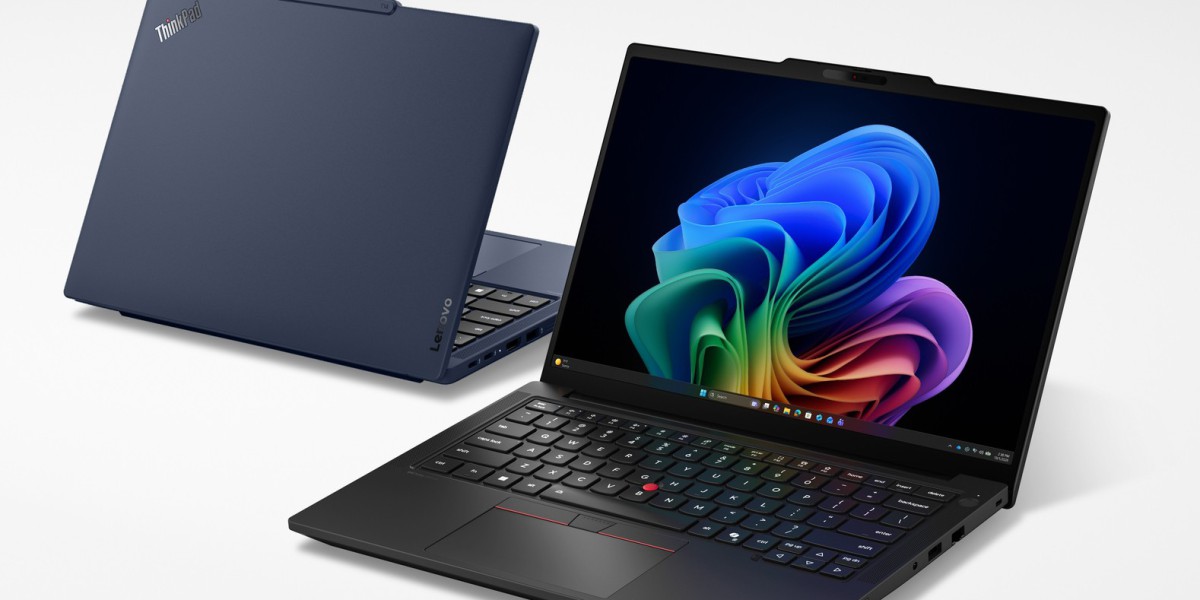
The Lenovo T14 is a 14-inch business laptop in Lenovo's ThinkPad T-series, positioned as the workhorse option for professionals who need dependable performance without the premium cost of the flagship X1 lineup. The current generation is available with either Intel or AMD silicon, giving buyers flexibility depending on whether they prioritize raw multi-core performance or power efficiency.
Unlike consumer laptops built around flashy design, the T14 is engineered around three priorities: durability, serviceability, and security. That's exactly why it's a staple in corporate IT fleets, government agencies, and small businesses that can't afford downtime.
Key Specifications: What's Under the Hood
Here's a breakdown of what the current Lenovo T14 generation actually offers, based on official specification sheets.
Processor Options
The T14 gives you a genuine choice between two chip ecosystems:
Intel configurations — Intel Core Ultra 5 and Ultra 7 processors (U, H, and V series), including efficiency-focused Lunar Lake chips and higher-performance Arrow Lake variants. Depending on the SKU, you'll find integrated Intel Arc graphics with NPUs delivering up to roughly 96 total platform TOPS on the top-end Core Ultra 7 configuration.
AMD configurations — AMD Ryzen AI 5 and Ryzen AI 7 PRO 300-series processors, paired with integrated Radeon 840M or 860M graphics. These chips are built for Copilot+ PC experiences and can hit up to around 66 TOPS of combined AI performance on the Ryzen AI 7 PRO 350.
Both platforms qualify as Copilot+ PCs on supported configurations, meaning they meet Microsoft's baseline for on-device AI features at least 16GB of RAM, 256GB of storage, and an NPU capable of 40+ TOPS.
Memory and Storage
The T14 supports up to 64GB of DDR5-5600 RAM (SODIMM), which is generous for a mainstream business laptop and gives you real headroom for multitasking, virtual machines, or memory-hungry business applications. Storage tops out at 2TB via NVMe PCIe Gen4 SSD, with some V-series Intel configurations supporting a PCIe 5.0 x4 slot.
Display Choices
Lenovo offers a genuine range of panel options on the T14, from a standard WUXGA (1920x1200) IPS display up to a sharper 2.8K OLED panel for users who care about color accuracy and contrast useful for anyone doing design review, photo editing, or simply staring at a screen for eight hours a day.
Battery Life
Battery life varies significantly by configuration and chipset. On the AMD version, Lenovo's own testing shows:
Up to 15.5 hours under MobileMark 25 testing in the max battery-life configuration
Up to 22.9 hours for local video playback at 150 nits
Real-world use will land lower than lab numbers, as always, but even accounting for that gap, the T14 comfortably handles a full workday on battery for most users.
Build Quality and Durability
Every T14 meets MIL-STD-810H military-grade durability standards, tested against extreme temperatures, humidity, dust, and altitude. It's also built with sustainability in mind the chassis incorporates recycled aluminum, recycled magnesium in the keyboard frame, and post-consumer recycled plastics across multiple components.
Security Features
Business buyers care deeply about security, and the T14 delivers with:
ThinkShield Lenovo's end-to-end hardware, software, and supply-chain security framework
Discrete TPM 2.0 for hardware-based encryption
Self-healing BIOS to recover from firmware attacks
Fingerprint reader and IR camera for biometric login
Human presence detection, which automatically locks the screen when you step away
Serviceability
One underrated strength of the T14: Lenovo designates RAM, storage, and the battery as Customer Replaceable Units. That means your IT department (or you, if you're handy) can repair or upgrade the machine without shipping it back to Lenovo a real cost and downtime saver over a multi-year deployment.

How the Lenovo T14 Compares to the Lenovo P16
If your workload leans toward CAD, 3D rendering, video production, or machine learning, the Lenovo P16 is the more logical choice. It's a 16-inch mobile workstation built around Intel Core Ultra HX-series processors and NVIDIA RTX PRO discrete graphics hardware the T14 simply doesn't offer.
Here's the practical difference:
Feature | Lenovo T14 | Lenovo P16 |
Target user | General business, office work | Engineers, creators, data scientists |
Graphics | Integrated (Intel Arc / AMD Radeon) | Discrete NVIDIA RTX PRO GPUs |
Screen size | 14" | 16" |
Portability | Lightweight, all-day carry | Heavier, desk-replacement class |
Price range | Mainstream | Premium workstation pricing |
In short: choose the T14 if you need a dependable everyday laptop that's easy to carry. Choose the P16 if your job actually requires GPU-accelerated rendering or simulation horsepower you'll pay considerably more, but you'll need that power.
How the Lenovo T14 Compares to the Lenovo ThinkPad X1 Carbon
The Lenovo Carbon X1 (formally the ThinkPad X1 Carbon) sits above the T14 as Lenovo's flagship ultraportable. It's thinner, lighter, and uses a premium carbon-fiber-reinforced chassis, along with a slightly more refined keyboard and trackpad experience.
The trade-off is price the X1 Carbon typically costs several hundred dollars more for comparable specs. If budget is a factor and you don't need the absolute thinnest chassis on the market, the T14 delivers the same core ThinkPad reliability and security stack at a friendlier price point, with a chassis that's arguably a bit more rugged for daily wear and tear in the field.
Real-World Use Case: Why Businesses Choose the T14
Consider a mid-sized accounting firm rolling out 200 laptops to its staff. The IT team needs machines that:
Handle spreadsheets, video calls, and accounting software without lag
Survive being tossed in a bag and hauled between home and office
Are easy to repair when a battery degrades after two years
Meet corporate security compliance requirements out of the box
The Lenovo T14 checks every one of these boxes without requiring workstation-tier budgets. This is precisely why ThinkPad T-series laptops remain a default recommendation across enterprise IT procurement they're not the flashiest machines, but they're dependable, serviceable, and secure by design.
Pros and Cons of the Lenovo T14
Pros
Choice of Intel or AMD processors to match performance or efficiency priorities
Up to 64GB of upgradable RAM and 2TB of storage
Strong battery life, especially on efficiency-focused configurations
MIL-STD-810H durability certification
Comprehensive ThinkShield security suite
User-replaceable RAM, storage, and battery
Display options ranging from standard IPS to 2.8K OLED
Cons
Integrated graphics only not suitable for GPU-intensive creative or engineering work
Chassis is noticeably thicker and heavier than the X1 Carbon
Higher-end configurations with OLED displays or maxed-out RAM can push the price close to premium territory
Some Intel configurations show weaker multi-threaded performance compared to the AMD variant
Frequently Asked Questions
Is the Lenovo T14 good for business use? Yes. It's specifically engineered for business environments, with enterprise security features, durability certifications, and easy serviceability that reduce total cost of ownership over the life of the device.
Can the Lenovo T14 handle gaming or video editing? Not comfortably. It relies on integrated graphics, so while it can handle light photo editing or occasional casual gaming, serious video editing or gaming performance requires a discrete GPU which is where the Lenovo P16 comes in.
Should I choose Intel or AMD for the T14? If you prioritize battery efficiency and Copilot+ AI features with strong single-core performance, the Intel Lunar Lake (V-series) chips are excellent. If you need stronger multi-core performance for heavier multitasking, the AMD Ryzen AI PRO configuration tends to benchmark better.
How does the T14 compare to the Carbon X1 for everyday use? For most everyday tasks email, browsing, office apps, video calls the two perform almost identically. The X1 Carbon wins on weight and premium build feel; the T14 wins on price and ruggedness.
Is the battery life realistic? Lab-tested numbers (up to 15.5–22.9 hours depending on configuration and workload) are best-case scenarios. Expect meaningfully lower real-world battery life under typical mixed use, though the T14 still comfortably covers a full workday for most users.
Conclusion
The Lenovo T14 earns its reputation as one of the most sensible business laptop choices available today. It doesn't try to be the thinnest or the most powerful machine on the market instead, it focuses on what actually matters for professionals: dependable performance, enterprise-grade security, all-day battery life, and a design built to survive years of daily use. If your workload demands serious graphics horsepower, the Lenovo P16 is worth the upgrade. If ultimate portability is your priority and budget allows, the Carbon X1 is there too. But for the vast majority of business users, the T14 remains the smart, balanced choice.
Have you used the Lenovo T14, or are you deciding between it and another ThinkPad model? Share your experience in the comments below, or pass this guide along to a colleague who's shopping for their next work laptop.