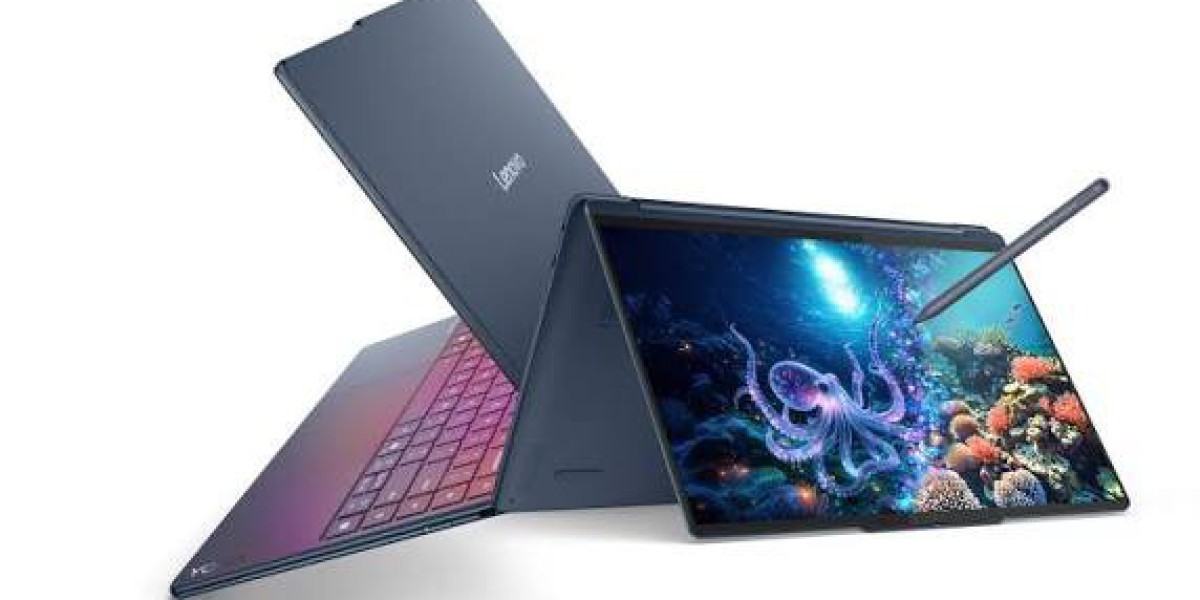

Lenovo Yoga 9 2-in-1: The Ultimate Convertible for Work, Creativity, and Everything In Between
If you've been shopping for a premium Windows laptop that can also transform into a tablet, you've probably run into the Lenovo Yoga 9 2-in-1 more than once. It's one of the most talked-about convertibles on the market right now, and for good reason it blends a striking design with genuinely useful hardware, rather than just chasing spec-sheet numbers.
In this guide, we'll walk through everything that matters: the design and build quality, the display technology, performance and battery life, how the included pen and 360-degree hinge actually hold up in daily use, and how the Yoga 9 2-in-1 compares to a very different kind of machine the Dell XPS 16 9640. We'll also touch on where it sits relative to its clamshell sibling, the Lenovo Yoga Pro 9, since the two get confused often. By the end, you'll know exactly who this laptop is for, and who should look elsewhere.
What Is the Lenovo Yoga 9 2-in-1?
The Yoga 9 2-in-1 is Lenovo's flagship convertible a 14-inch laptop with a 360-degree hinge that folds flat into tablet mode, tent mode, or stand mode. It's part of the broader Yoga 9i lineup, which also includes a traditional clamshell option (the Yoga Pro 9) and a dual-screen variant (the Yoga Book 9i).
What sets the 2-in-1 apart is its focus on flexibility without sacrificing premium materials. The chassis is CNC-machined aluminum, finished in either a deep Cosmic Blue or a more understated Luna Grey, with color-matched keys and a rotating soundbar hinge that houses part of the speaker system. It's the kind of laptop that photographs well and feels even better in hand solid, but never bulky.
At roughly 2.9 pounds and just over half an inch thick, it's light enough to carry around all day and comfortable to hold as a tablet, which matters more than people expect once you're actually using the pen for notes or sketches.
Design and Build Quality
Lenovo has leaned into a "quiet luxury" look for the Yoga 9 2-in-1. There's no aggressive branding, no gamer-style accents just clean lines, matte surfaces, and a curved "comfort edge" along the keyboard deck that makes typing feel less like resting your wrists on a metal ledge.
A few standout design details:
Soundbar hinge: The 360-degree hinge doubles as a housing for part of the four-speaker audio system, which noticeably improves sound compared to laptops that cram speakers under the keyboard.
Haptic touchpad: Instead of a mechanical clickpad, the trackpad uses haptic feedback, which stays consistent whether you're clicking near the top or the bottom edge.
Yoga Pen included: A pressure-sensitive stylus is bundled in the box and stores in a small garage or magnetic dock, depending on the configuration — no separate purchase needed for note-taking or light digital art.
The keyboard deck avoids the ultra-minimalist, capacitive-button trend some rivals have adopted. You get real, tactile keys with reasonable travel, which matters if you spend hours a day typing.
Display: Where the Yoga 9 2-in-1 Really Shines
This is arguably the laptop's best feature. Lenovo offers two 14-inch, 16:10 OLED panel options:
2.8K (2880 x 1800) at 120Hz — adaptive refresh rate, roughly 99% Adobe RGB coverage, and VESA HDR True Black 1000 certification, hitting around 500 nits (1,100 nits in HDR).
4K (3840 x 2400) at a fixed 60Hz — VESA HDR True Black 500 certification, around 400 nits (600 nits in HDR).
Both versions support Dolby Vision, full sRGB and P3 color coverage, TÜV low blue light certification, and Eyesafe certification for reduced eye strain. If you're torn between the two, the 2.8K/120Hz panel is the more balanced pick for most people the higher refresh rate makes everyday scrolling and video noticeably smoother, and the color accuracy is still excellent for photo editing or content review.
For anyone who does color-critical creative work, either panel will outperform the vast majority of Windows laptops on the market, OLED or not.
Performance and Everyday Speed
The current-generation Yoga 9 2-in-1 runs on Intel's Lunar Lake platform, typically configured with an Intel Core Ultra 7 processor, 32GB of LPDDR5x memory, and a 1TB SSD. This isn't a chip built for sustained, heavy workloads like video rendering it's tuned for efficiency, meaning strong daily performance paired with excellent battery life rather than raw horsepower.
In real-world use, that translates to:
Snappy multitasking across browser tabs, office apps, and video calls
Surprisingly capable integrated graphics for an ultraportable enough for light photo editing and casual gaming
Copilot+ PC certification, meaning it meets Microsoft's requirements for on-device AI features
If your workload involves heavier tasks like 3D rendering, large-scale video editing, or gaming at high settings, this isn't the machine for that and Lenovo doesn't market it that way. It's built for people who value portability, display quality, and battery life over sheer processing muscle.







